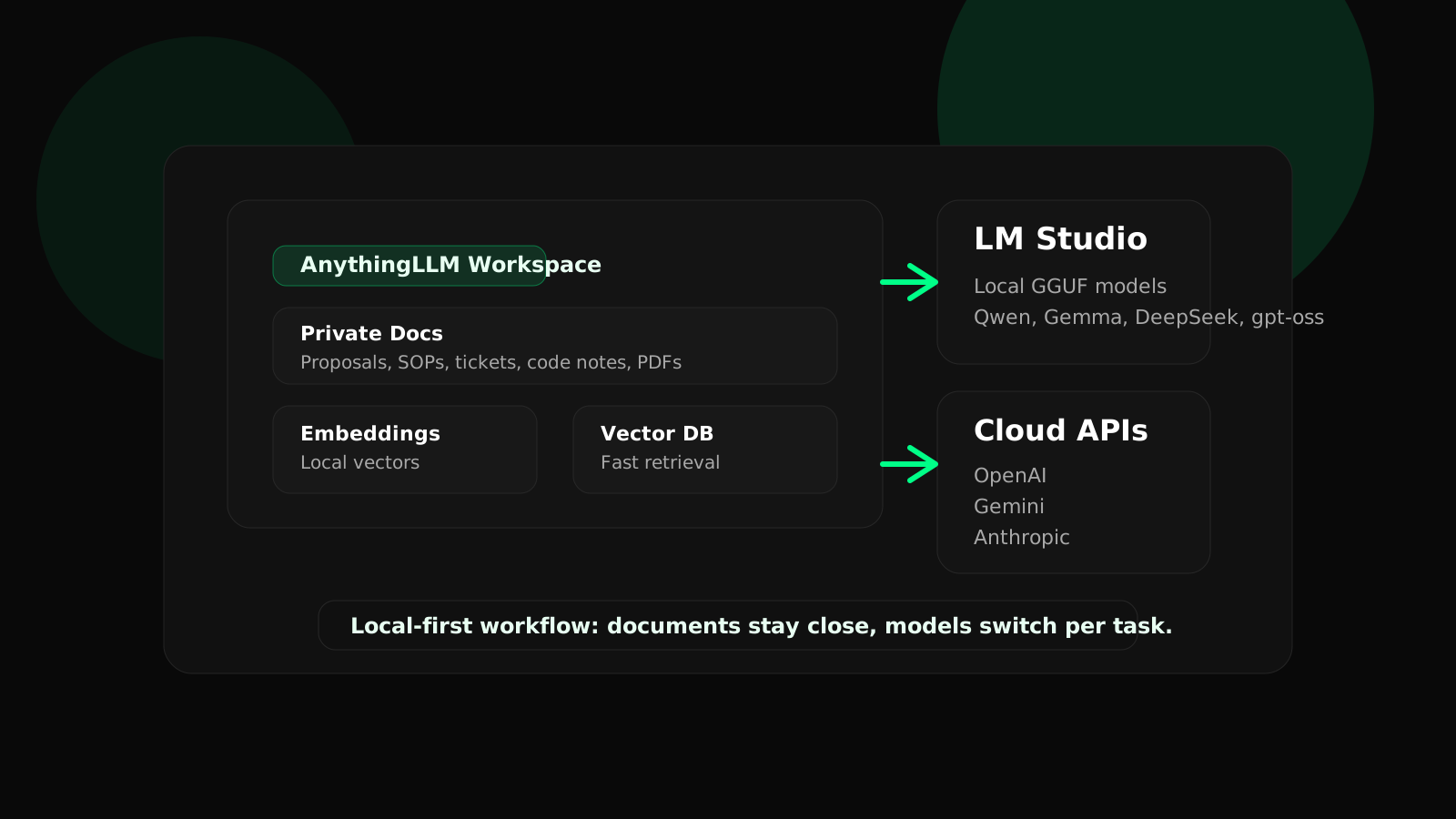
The best local AI setup on a MacBook is not a toy chatbot. It is a local-first working environment where your laptop handles retrieval, document processing, and a large part of generation, while stronger cloud models remain available for the jobs that justify them.
AnythingLLM is a good control layer for this because it gives you workspaces, document chat, embeddings, vector database connections, model switching, and agent-style features without forcing you to build everything from scratch. Its macOS documentation also notes that Apple M-series chips run local inferencing considerably faster than Intel Macs, which is why Apple Silicon is now a practical base for serious experimentation.
LM Studio complements that well. It is both a local model runner and a local inference server. Its own docs state that once models are downloaded, chatting, document work, and local server use can all operate offline. Requests to the LM Studio server use OpenAI-style endpoints while staying on your machine.
The stack that makes sense
AnythingLLM
Use it for workspaces, document ingestion, retrieval, model switching, and the business-facing interface around your AI workflows.
LM Studio
Use it to browse, download, load, and serve local GGUF models from your MacBook.
Local embedder
Use a local embedding model so your documents can be chunked and searched without leaving the device.
Local vector database
Keep retrieval close to the data using AnythingLLM's supported local vector stores such as LanceDB, Chroma, or Milvus.
Practical split
Let AnythingLLM be the workspace and retrieval layer. Let LM Studio be one of your local engines. Keep your documents and embeddings local. Only escalate to cloud APIs when the task truly needs it.
This arrangement keeps your architecture simple. You avoid reinventing ingestion, chunking, embeddings, and retrieval, while still getting the freedom to run more local models instead of binding yourself to a single vendor.
How to set it up on a MacBook
1. Install AnythingLLM
Use the correct macOS build for your hardware or install it with Homebrew. On Apple Silicon, use the M-series package.
2. Install LM Studio
Download LM Studio, browse the model catalog, and pull down a few local models that fit your RAM and speed budget.
3. Start the LM Studio inference server
AnythingLLM's LM Studio docs are explicit here: LM Studio must be running its built-in inference server before AnythingLLM can connect to it.
4. Connect AnythingLLM to local providers
In Settings, choose LM Studio for the local LLM connection, then select a local embedder and local vector database.
Once that is working, you can start experimenting with more local model families. LM Studio's current docs highlight local support for families such as gpt-oss, Qwen3, Gemma 3, and DeepSeek, which gives you a wide range of tradeoffs between reasoning quality, speed, and memory use.
How LM Studio and AnythingLLM work together
A lot of people treat these tools as competitors. That is the wrong frame. They solve different parts of the problem.
LM Studio is the engine room. It helps you find and run local models, then exposes them over a local API. AnythingLLM is the operating layer. It gives you the workspace, document pipeline, retrieval controls, and the interface where people actually work with those models.
Important limitation
AnythingLLM's official LM Studio embedder docs warn that LM Studio's inference server can load multiple LLMs or a single embedding model, but not both at the same time. In practice that means LM Studio cannot be both your chat model server and your embedder simultaneously.
The clean answer is to split responsibilities. Use LM Studio for your local chat model, and use a separate local embedder through AnythingLLM, Ollama, or another supported embedding path. That avoids constant model swapping and keeps your document indexing flow stable.
If you prefer a more infrastructure-like workflow, Ollama is still a strong option. If you prefer browsing models visually, loading multiple local chat models, and experimenting with different quantizations, LM Studio is the better fit.
How to build your own private RAG flow
This is where the productivity gain actually happens. According to AnythingLLM's RAG docs, the platform does not make the model "know everything" in your documents. Instead it chunks your data, embeds it, stores it in a vector database, and retrieves a small set of relevant passages for the current question. Their docs describe this as typically pulling back 4 to 6 relevant text chunks.
Create separate workspaces
Keep HR, proposals, client delivery, product manuals, and internal SOPs in separate workspaces so retrieval stays clean and permission boundaries stay obvious.
Clean your source files first
Bad PDFs, duplicated pages, and noisy exports damage retrieval quality long before the model gets involved.
Choose embeddings carefully
A good embedder matters more than most people expect. Retrieval fails quietly when embeddings are weak or domain-misaligned.
Test with hard questions
Do not just ask broad friendly prompts. Ask for edge cases, exceptions, conflicting policies, dates, and pricing details to see whether the right chunks return.
The core local-first rule is simple: if the documents are sensitive, keep ingestion, embeddings, vector storage, and retrieval on your MacBook. If the final generation step can be external, you may choose to send only the retrieved context to a cloud model. But that is still not fully local, so be honest with yourself about the privacy boundary.
Private AI is not a slogan. It is an architectural decision about which parts of the pipeline leave the machine.
How to connect OpenAI, Gemini, and Anthropic
AnythingLLM includes built-in provider pages for OpenAI, Google Gemini, and Anthropic. In each case the pattern is the same: add a valid API key, let the model list populate, then choose the model you want in Settings. That means you can keep the same workspace and private dataset while swapping only the answering model.
OpenAI
Best when you want strong coding, structured workflows, and top-end reasoning. As of April 3, 2026, OpenAI's model docs position GPT-5.4 as the flagship starting point, with GPT-5.4-mini and GPT-5.4-nano for cheaper and faster workloads.
Gemini
Strong for large-context analysis and cost-performance balance. Google's current Gemini docs highlight Gemini 2.5 Pro, Gemini 2.5 Flash, and Gemini 2.5 Flash-Lite.
Anthropic
Excellent for high-quality writing, synthesis, and careful reasoning. Anthropic's current docs highlight Claude Opus 4.1 and Claude Sonnet 4 as the main options for serious work.
Hybrid use
Keep retrieval local in AnythingLLM and only change the response model per task. That gives you stronger answers without rebuilding the workspace every time.
There is one important wrinkle with Anthropic. Anthropic's own embeddings guide says they do not provide an embedding model. So if you want Claude for generation inside a RAG workflow, keep your embeddings local or use another embedding provider.
Gemini also deserves special attention for repeated large-document work because Google provides context caching. OpenAI, meanwhile, is very strong when your workflow is turning into a more agentic or coding-heavy system instead of a pure document assistant.
Which model strategy actually works
Most people waste time trying to choose one perfect model. That is not how productive teams should think. Choose a model ladder.
Local lightweight models
Use these for drafting, note cleanup, quick document lookup, inbox help, and low-risk internal tasks.
Local stronger models
Use these for coding help, deeper reasoning, or longer-form synthesis when your MacBook can handle them.
Cloud frontier models
Use these only when quality matters enough to justify cost and privacy tradeoffs.
Stable local retrieval
Keep retrieval and embeddings consistent so your answer quality does not swing wildly between sessions.
The best setup for most teams
Local documents. Local embeddings. Local vector database. Local default model. Optional cloud escalation for the final answer when the task is high-value or unusually difficult.
Quick answers
Can a MacBook really handle local AI well?
Yes, especially on Apple Silicon. You are not replacing a GPU cluster, but you can absolutely run useful local LLM workflows and private RAG on-device.
Should I use LM Studio or AnythingLLM?
Use both. LM Studio is for running models. AnythingLLM is for workspaces, retrieval, and user-facing operations.
Is a cloud API still useful if I care about privacy?
Yes, if you draw the boundary carefully. Keep ingestion and retrieval local, then decide case by case whether sending retrieved context to a cloud model is acceptable.
What gets most people ahead fastest?
A clean private workspace per job function, a stable local RAG pipeline, and a model ladder that escalates only when necessary.
Share This Article
Share it to social, send it on WhatsApp, or copy the link directly.